AI development · MCP integrations · Software development · Systems integration · Business intelligence · Data engineering

John Botha.

I build AI-connected applications and data systems that make complex work easier to run and understand.

I design MCP integrations that give AI assistants live application context and governed ways to act. In PrototypeX, AI helps build, simulate, diagnose, and refine virtual systems; in System Synthesis Studio, it helps refine system designs; and in Trace Accounting, it supports query, audit, and governed operations and configuration.

01 / Selected work

Projects with purpose.

Three applications addressing complex work in virtual prototyping, system design, and accounting.

PrototypeX demonstrations

Virtual systems in action.

An LLM built these configured models under user guidance in PrototypeX. Each recording shows the resulting simulation running in the application.

Simulation 01

Rotating ring

A virtual ring spins to create approximately 1 g of apparent gravity at its outer deck. The recording compares attached and free-floating objects with live acceleration readings.

Simulation 02

Rocket flight

A virtual rocket combines a main motor, control thrusters, sensors, and landing gear in a scripted climb and descent with live telemetry.

Simulation 03

Autonomous drone

A virtual quadcopter uses controlled rotors and onboard sensors for a scripted takeoff, hover, and guided descent.

AI-assisted case study

From a written brief to a completed virtual mission.

An AI client used PrototypeX to create an autonomous platform, test a three-waypoint route, diagnose a control limitation, revise the model, and run it again. The useful result is the visible loop from intent to measured evidence.

  1. Describe
  2. Build
  3. Test
  4. Diagnose
  5. Revise
3Waypoints reached
44.98 sRecorded route time
0.15 mFinal modeled distance

These are results from a configured virtual model. They do not establish physical performance or engineering certification.

Recorded PrototypeX workflow; playback is accelerated.

System Synthesis Studio turns a business or system design into a structured, reusable foundation for implementation. The user describes the system once, then guided questions and an MCP-connected AI assistant help refine that description into a live system contract covering the relational data model, workflows, validation rules, application behavior, data warehousing, reporting, and related design requirements.

Once the design is accepted, selected deliverables are generated from that shared contract. These can include documentation, database scripts, transactional application projects, API contracts and implementations, warehouse schemas and load scripts, and prebuilt Power BI models and reports.

The generated outputs provide a connected implementation view of the system—from operational processing through data integration and analytical reporting—and can target multiple database platforms, desktop and web applications, and Azure data platform assets.

The underlying design remains reusable. It can be saved, revised through successive variations, and used to regenerate affected deliverables as requirements evolve, allowing generated outputs to serve as a foundation that can be extended toward the final product.

Deliverable generation is primarily deterministic rather than dependent on AI-generated code. Once the system contract has been established, supported outputs can be generated repeatedly using purpose-built code generators without consuming AI tokens for the generation itself. AI is used where it adds the most value: helping the user explore, clarify, validate, and refine the system design.

How it works

Select any screenshot to inspect it at full size.

  1. 01 / Define

    Describe the system

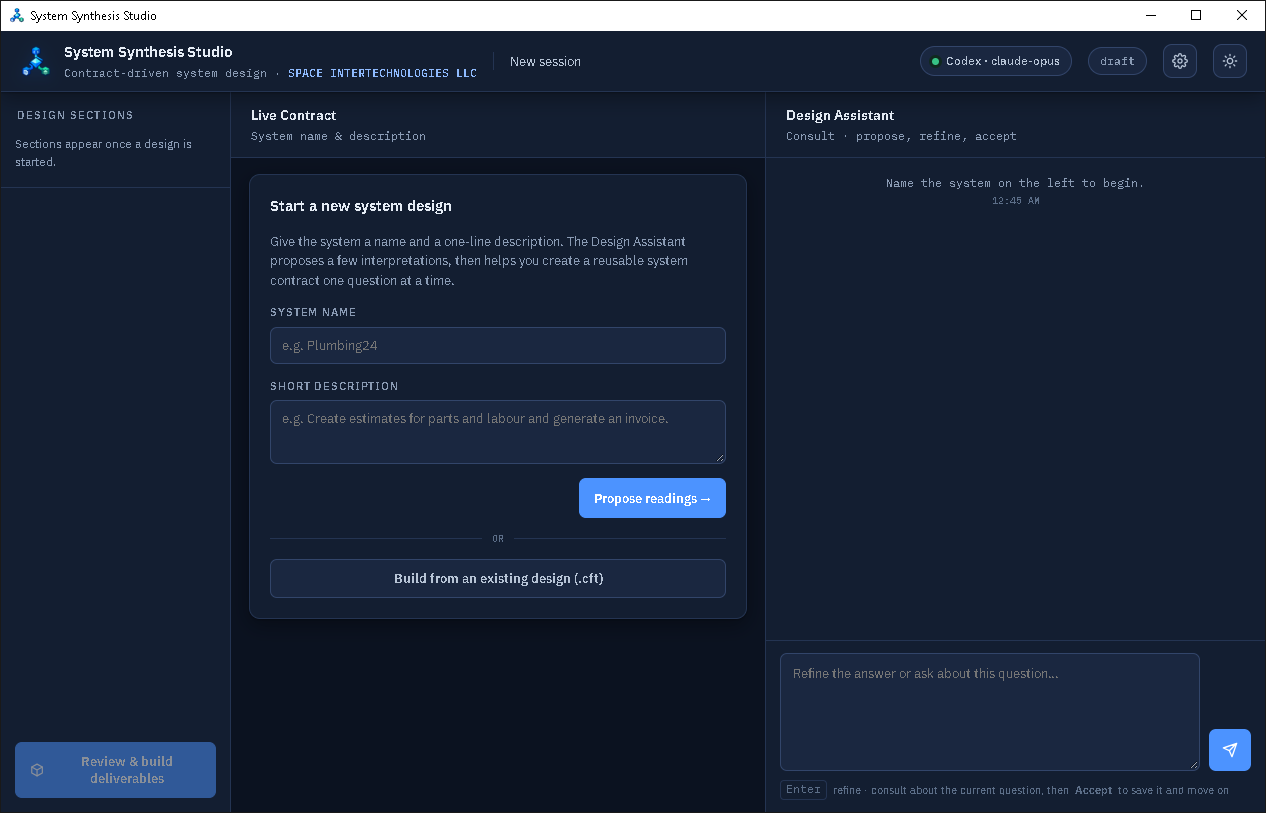
    Start with a name and short description, then work through several design sections, usually with four to six questions per section. The assistant can help propose and refine answers alongside the live contract. Alternatively, the user can choose to have AI complete all sections and questions.

    System Synthesis Studio new-design screen with system name and description fields, design sections, and an AI Design Assistant panel
    The starting screen places the live contract beside the AI Design Assistant.
  2. 02 / Select

    Choose the outputs

    After accepting the contract, choose a build profile or individual deliverables. The selection can include data, reporting, documentation, databases, and API outputs.

    System Synthesis Studio select-deliverables screen showing four build profiles, an output location field, and expandable deliverable categories with selection counts
    Choose a build profile or select deliverables by category; the footer shows how many are selected.
  3. 03 / Confirm

    Review the build plan

    Before building, inspect the selected outputs, dependencies, warnings, and the exact folders where the deliverables will be written.

    System Synthesis Studio confirm-build screen listing the package, the deliverables folder, the resolved outputs and automatically included items
    The confirmation screen lists the package, deliverables folder, resolved outputs and any automatically included dependencies.
  4. 04 / Open

    Use the generated package

    The results screen groups each generated item and explains how to open it. In the illustrated build, the package includes Power BI assets and sample data; the report has multiple KPI and reporting pages.

    System Synthesis Studio build-complete screen with generated deliverable groups and options to open a deliverable or its containing folder
    After the build, generated items are grouped, with actions to open a deliverable or its containing folder.
Example outputs from the illustrated buildData dictionaryEntity relationship diagramExcel Pivot workbookPower BI reportSemantic modelSample datasets
Trace Accounting application splash screen

03 / Accounting

Trace Accounting

Configurable accounting software with MCP integration for AI-assisted query and audit, authorized operations, and governed configuration.

Current status Major development work is complete. Further refinement and testing are underway.

MCP.NET 8SQL ServerWinForms

These applications are owned by SPACE INTERTECHNOLOGIES LLC.

02 / AI development

AI that can work with real systems.

I build application integrations that give AI assistants useful context and clearly defined ways to act. MCP connects the assistant to the application; people retain control over changes that need review or approval.

01 / System design

System Synthesis Studio

MCP gives an assistant access to the active design so it can help examine requirements, suggest improvements, and work with the same design the desktop app uses.

02 / Financial operations

Trace Accounting

Its MCP interface separates read-only insight, authorized operations, and governed configuration into distinct modes.

03 / Virtual prototyping

PrototypeX Studio

I guide AI-assisted model creation, simulation, diagnosis, and revision in a full application, then inspect the recorded results and the model's limits.

03 / Experience

Experience across software, data, and operations.

Across more than 25 years in technology, my work has spanned the development of loan, accounting, retail, and web systems and backend API integrations, as well as BI and data engineering that includes financial and retail data warehousing, OLAP and SSAS Tabular models, dashboards, reporting, migrations, and backups. Earlier accounting and auditing work shaped my focus on controls and reliable financial information.

01

Business Intelligence & Reporting

Enterprise, financial, and operational reporting; dashboards; call-centre dashboards; and reporting system development.

02

Data Warehousing & Data Engineering

Financial and retail data warehouses, ETL, dimensional data structures, data integration, and migration.

03

SQL Server Analysis Services

SSAS Tabular models, OLAP and multidimensional cubes, analytical models, and enterprise BI datasets.

04

API & Systems Integration

Backend API integrations, data exchange between business systems, automated integrations, and supporting backend processes.

05

Application & Systems Development

Business applications, loan systems, retail systems, accounting systems, and custom internal applications.

06

Web Development

Business websites, web-based reporting systems, and enterprise web applications.

07

Financial & Accounting Systems

Accounting system development, financial data warehousing, financial reporting, and accounting-oriented BI solutions.

08

Database & Platform Migrations

Application, database, BI platform, and reporting migrations.

09

Retail Systems & Analytics

Retail data warehousing, retail system development, reporting, dashboards, and operational analytics.

10

Banking & Financial Services Technology

Loan system development, banking reporting, financial analytics, and enterprise data solutions.

11

Infrastructure & Operational Support

Database backups, network support, and system maintenance.

12

Accounting & Auditing

Professional accounting and audit experience at Deloitte provides a foundation for financial systems and BI.

Core toolsSQL Server · T-SQL · SSIS · SSAS · SSRS · C#/.NET · VB.NET · VB6 · Power BI Paginated Reporting · Excel/VBA · REST APIs · OAuth 2.0

04 / Approach

Make the difficult understandable.

I’m drawn to software that helps people model a problem, see what is happening, and make an informed next decision.

Across these projects, that means turning detailed rules and workflows into clear interfaces, preserving evidence of what happened, and keeping people in control of AI-assisted changes.